



How to run your WooCommerce store with Claude in 2026

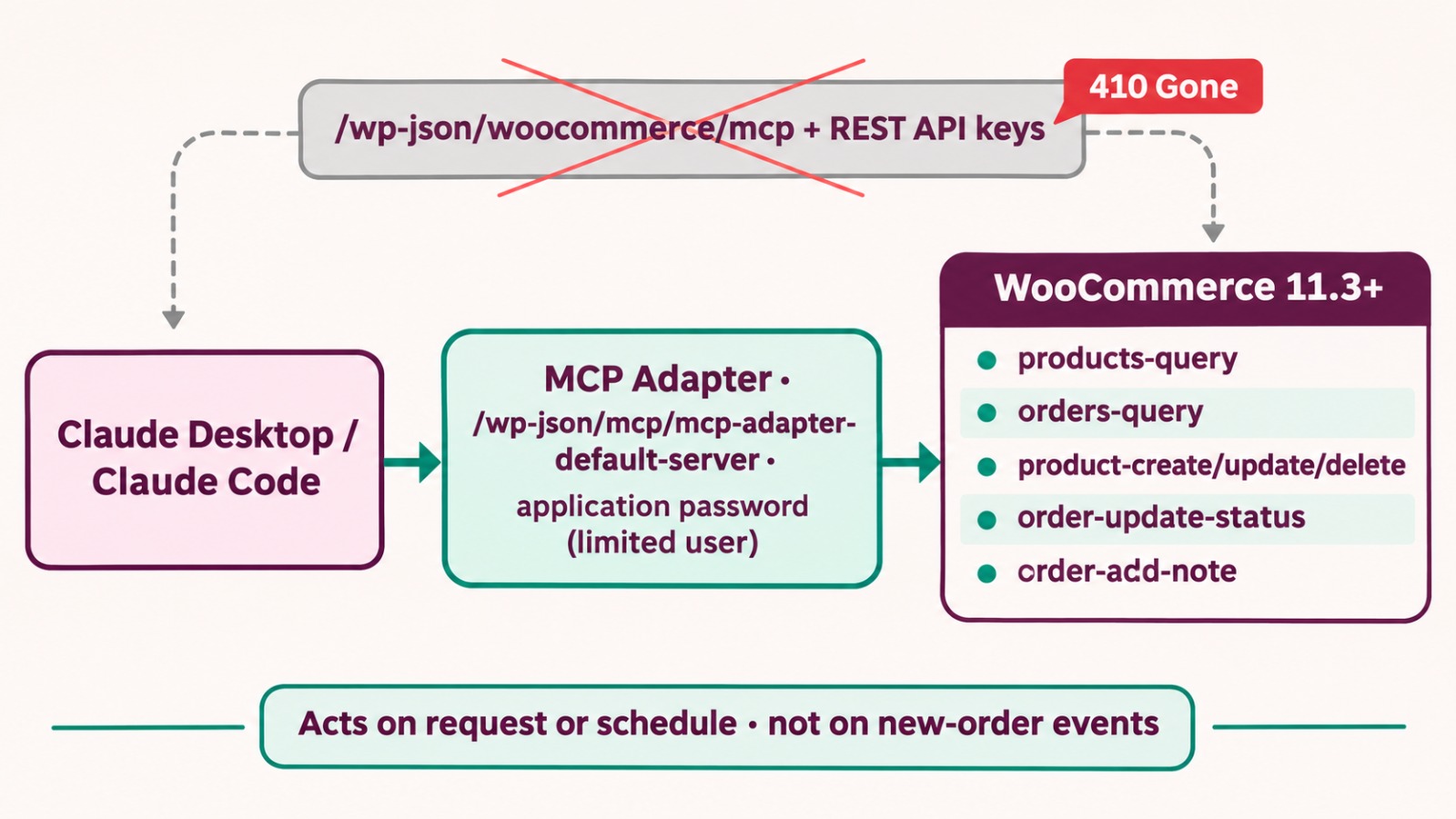
WooCommerce now has official abilities that let Claude read orders and products, update order status, add order notes, and create or edit products. From WooCommerce 11.3, you connect Claude through the free WordPress MCP Adapter plugin using an application password. Older guides that use the /wp-json/woocommerce/mcp endpoint no longer work.
Key takeaways
Claude can query orders and products, update order status, add notes, and create or edit products
Setup needs WordPress 6.9+, WooCommerce 11.3+, the MCP Adapter plugin and an application password
The old /wp-json/woocommerce/mcp endpoint returns HTTP 410, so revoke any keys made for it
Claude acts when you ask or on a schedule; it doesn’t react to new orders by itself
A day in a London tea shop
Picture a small online tea shop in London that runs on WooCommerce.
At 8 AM the owner asks Claude, “Show me yesterday’s orders and which ones are on hold.” Claude reads the live store and lists them.
At 10 AM a supplier is late, so she asks Claude to add a note to three orders saying they’ll ship Thursday, and to set them to on hold.
At 1 PM a new blend arrives, and Claude creates “Winter Earl Grey, 100g, £12” as a draft for her to review.
At 3 PM she starts a winter sale and asks for 10% off all green teas, then spot-checks a few products.
What Claude can do in WooCommerce
The official abilities cover products and orders:
products-query and orders-query for reading
product-create, product-update and product-delete for products (delete moves an item to trash by default)
order-update-status and order-add-note for orders
Customers and coupons aren’t part of these core abilities yet.
Set it up in four steps
Update WordPress to 6.9 or later and WooCommerce to 11.3 or later. The core product and order abilities are on by default from 11.3.
Install and activate the free MCP Adapter plugin.
Create a separate WordPress user for Claude with only the permissions it needs, then generate an application password for that user. Leave out delete rights if you don’t need them.
In Claude Desktop or Claude Code, add your store as an MCP server using Automattic’s @automattic/mcp-wordpress-remote proxy, pointed at https://yourstore.com/wp-json/mcp/mcp-adapter-default-server, with that username and application password.
Why many tutorials no longer work
Earlier guides used /wp-json/woocommerce/mcp with WooCommerce REST API keys sent in an X-MCP-API-Key header. Since WooCommerce 11.3, that endpoint returns HTTP 410, meaning it’s gone. WooCommerce recommends revoking any REST API keys you created for it and switching to the MCP Adapter endpoint.
Limits to plan around
Claude works when you ask it to, or on a schedule you set. It won’t respond automatically when a new order arrives. Start with read-only questions for a week, then allow product edits and check a sample of every bulk change.
Frequently asked questions
Trending question: Does Claude work with WooCommerce?
Yes. Through the WordPress MCP Adapter, Claude can read and manage WooCommerce products and orders using WooCommerce’s official abilities.
Trending question: Can Claude automatically respond to new WooCommerce orders?
No. Claude acts when you ask or on a schedule you set. For instant reactions to new orders, you still need webhooks or a separate automation tool.
Why does my WooCommerce MCP connection return a 410 error?
You’re using the old /wp-json/woocommerce/mcp endpoint, which was switched off in WooCommerce 11.3. Connect through the MCP Adapter endpoint with an application password instead.
Is it safe to give Claude access to my store?
Use a separate user with only the permissions Claude needs, avoid granting delete rights unless necessary, and review bulk changes.

By Professional qualification a Computer Engineer, By Profession an Online Marketing Strategist and Web Application Development Expert, By Industry position working as a CEO at Zebra Techies Solution!