



How to Use Free WordPress AI Agents to Build a Site and Grow a Blog (Safely)

WordPress Studio’s built-in AI agent, Studio Code, is free in beta and can build a WordPress site from a plain-English prompt. On a live site running WordPress 6.9 or later, the free MCP Adapter plugin lets agents such as Claude, Cursor or VS Code connect and help with drafts. Traffic still comes from useful, human-edited posts, not mass-produced AI content.
Key takeaways
WordPress Studio and Studio Code (free beta) build a full site locally from a prompt
The MCP Adapter connects AI agents to live sites, but give the agent limited access
Let the agent draft posts and social captions; a person edits and publishes
Google penalises scaled, low-value content, whether AI or humans produce it
Stage 1: The builder (WordPress Studio and Studio Code)
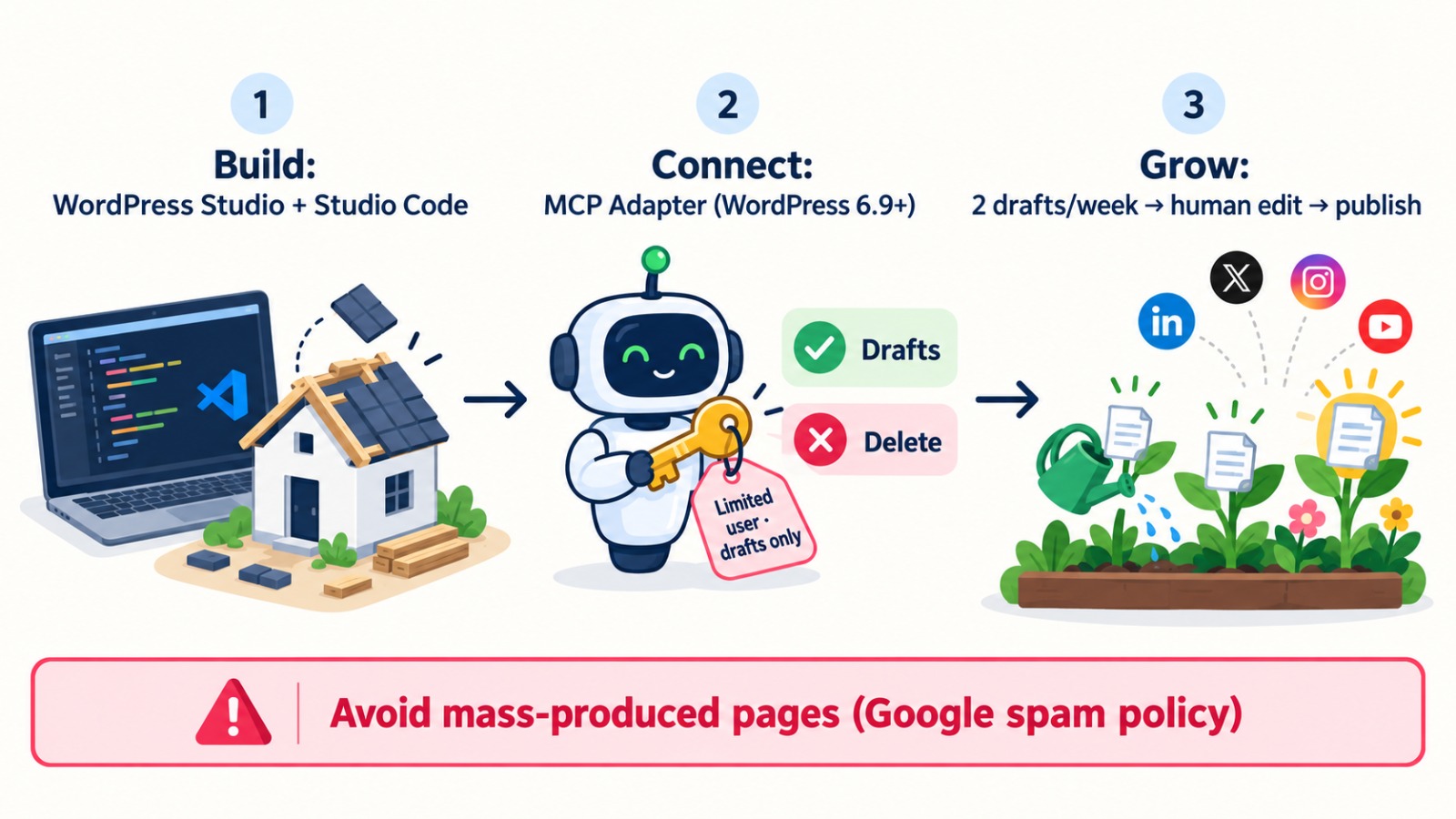
Download WordPress Studio, the free desktop app, create a site, and open Studio Code. Log in with a WordPress.com account when prompted. Then give it a clear brief, for example: “Build a site for a London florist with a home page, a shop, same-day delivery and a contact page. Make it fast and mobile-friendly.” Studio Code creates pages, installs themes and plugins and runs WP-CLI commands. Run /need-for-speed for a performance check and /preview for a temporary shareable link. It’s in beta, so check every page before launch.
Stage 2: The spare key (MCP Adapter)
WordPress 6.9 added the Abilities API, and the official MCP Adapter plugin exposes those abilities to AI agents. Remote sites connect through @automattic/mcp-wordpress-remote using a username and an application password. Two important points:
Out of the box, the adapter shares only basic site information. For an agent to write drafts, a plugin or developer must register that ability.
Give the agent its own limited user. WordPress’s guidance is to use limited-capability users, prefer read-only abilities on public endpoints, and never allow deletion without proper permission checks.
Stage 3: The garden (content and promotion)
Ask the agent to draft two posts a week, such as “How to keep roses fresh for seven days”, plus a caption for each social channel. A person then edits each draft, adds real photos and first-hand experience, and publishes. Share each post on social media using the captions.
The honest part about traffic
Google’s spam policies treat mass-produced pages made mainly to manipulate rankings as scaled content abuse, whether AI or people wrote them. A steady stream of genuinely useful posts builds traffic. A hundred thin posts in one night can do the opposite.
What’s free and what isn’t
WordPress Studio, Studio Code (in beta) and the MCP Adapter are free. Your domain and hosting are not. An external AI agent may also cost money, unless you use a free tier or a local model.
Frequently asked questions
Can an AI agent really build a WordPress site for free?
Yes. WordPress Studio is free, and its Studio Code agent is free in beta. You still pay for your domain and hosting when you go live.
What is the WordPress MCP Adapter?
It’s an official free plugin that lets AI agents such as Claude, Cursor or VS Code use your site’s registered abilities through the Model Context Protocol.
Is it safe to let an AI agent publish blog posts?
Keep the agent to drafts only, under a limited-access user, and have a person review before publishing.
Will AI-written blogs automatically bring traffic?
No. Google penalises mass-produced content made to manipulate rankings. Useful, human-edited posts published consistently work better.

By Professional qualification a Computer Engineer, By Profession an Online Marketing Strategist and Web Application Development Expert, By Industry position working as a CEO at Zebra Techies Solution!