



Magento AI agents in 2026: what’s built in, what’s coming and what works today

Magento Open Source has no built-in admin AI agent. Adobe has announced a Commerce MCP Server for Adobe Commerce, which its docs still list as coming soon. Today, you can connect Claude or ChatGPT to a Magento 2.4 store through a read-only MCP extension and manage stock, carts and sales reports in plain English.
Key takeaways
Adobe’s Commerce MCP Server will cover catalog, pricing, inventory, promotions, orders and returns, but it isn’t available yet
Free read-only MCP extensions work today on Magento Open Source and Adobe Commerce
Write access needs layered permissions; start with low-risk jobs
Install on staging first and review any third-party module’s code
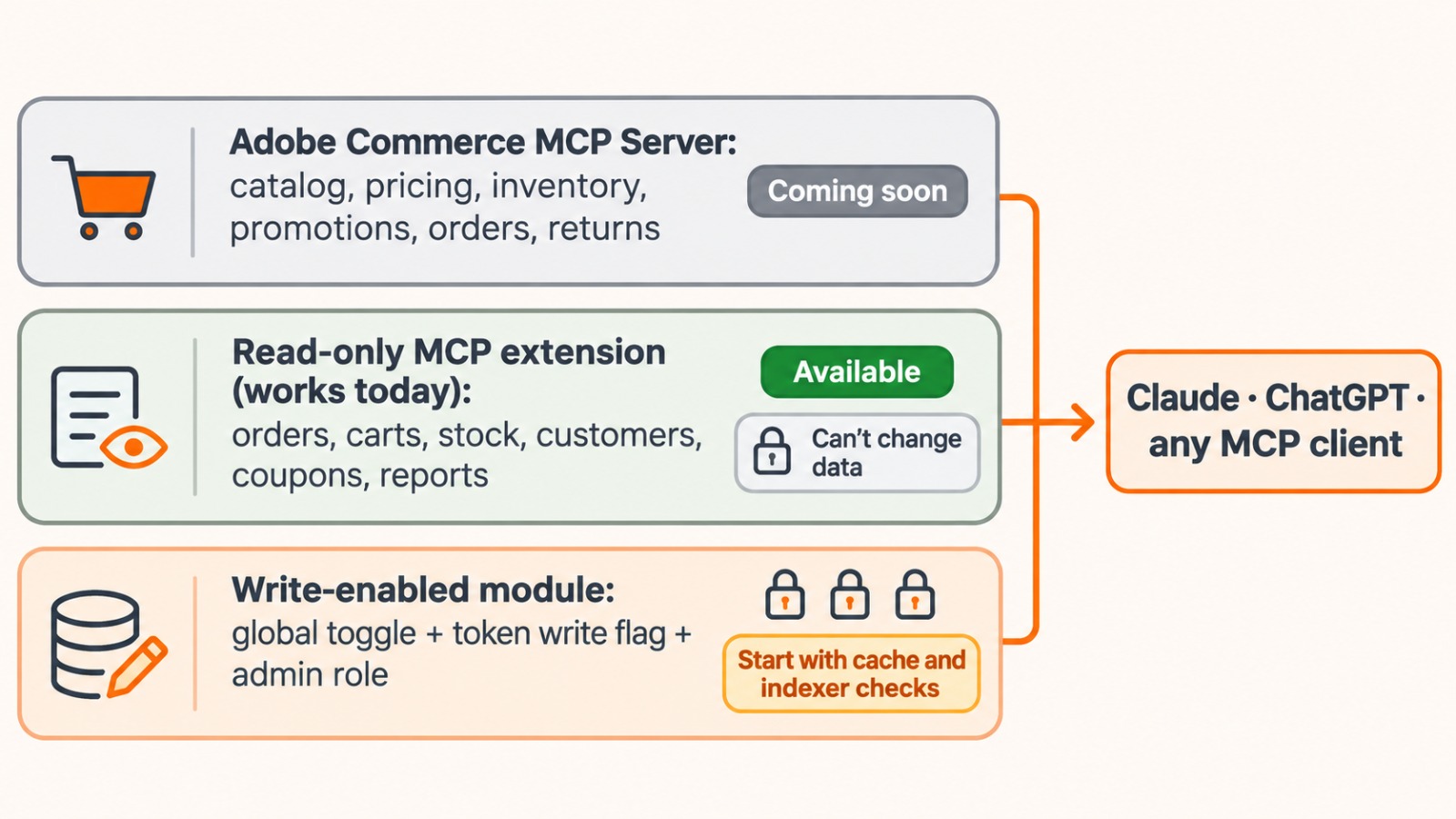
The smart-home way to think about it
Upgrading a Magento store is like turning an older house into a smart home. You can wait for new built-in wiring, plug in sensors that only watch, or add smart switches that act with permission. Each layer suits a different stage.
What Adobe has announced
At Adobe Summit 2026 in April, Adobe announced a Commerce MCP Server that exposes catalog, cart, pricing, inventory, promotions, checkout, order management and post-purchase flows to AI agents. It also announced Brand Concierge for shoppers and developer agents for migrations. Adobe’s documentation still marks the MCP server “Coming Soon”, and the announcements focus on Adobe Commerce, mainly its cloud service.
What works today: a read-only agent
Freento’s MCP Server (v1.2.0) is free and MIT licensed, and it’s listed on Adobe Commerce Marketplace. It supports Magento Open Source and Adobe Commerce 2.4. It gives AI clients read-only access to orders, abandoned carts, products, stock, customers, coupons, admin users and system versions. It can also total and average orders by status, month, payment method or store. Access uses OAuth 2.0 with PKCE and role-based permissions, and the module can’t change store data.
Take an electronics store in Dubai. The manager asks Claude, “Which products have fewer than 20 units in stock?”, then “Show abandoned carts over AED 1,000 this week”, then “What was revenue by payment method last month?” Each answer comes from live store data. [CONFIRM: add a Zebra Techies client example here only if the team has actually installed this for a Magento client.]
How to set it up
Install the extension on a staging copy of your store first.
Create an OAuth client and give its role access only to the tools it needs.
Connect Claude Desktop or Claude Code with a bearer token, or ChatGPT through OAuth.
Spend a week asking questions before you consider any write access.
Adding write access later
Some modules allow changes. Magebit’s open-source magento2-mcp-module adds tools that create, update or delete records. These only work when a global “Allow write tools” toggle is on, the token or OAuth scope has write rights, and the admin role permits that specific tool. It’s a young project, so start with low-risk checks such as cache and indexer status before letting it touch products or orders.
Frequently asked questions
Trending question: Does Magento have a built-in AI agent?
Not for Magento Open Source. Adobe has announced a Commerce MCP Server for Adobe Commerce, but its documentation still lists it as coming soon.
Trending question: Can I connect ChatGPT or Claude to my Magento store?
Yes. An MCP extension, such as Freento’s free read-only module, lets Claude, ChatGPT and other MCP clients query your live store data.
Is a read-only Magento AI agent safe?
It’s the safest place to start, because it can’t change data. Still, limit its role, use staging first and review the extension’s code.
Can an AI agent update products or orders in Magento?
With a write-enabled module, yes. Keep write access behind a global toggle, token permissions and admin-role checks.

By Professional qualification a Computer Engineer, By Profession an Online Marketing Strategist and Web Application Development Expert, By Industry position working as a CEO at Zebra Techies Solution!